Only changed files
Files are compared by SHA-256 checksums, so you send a few files instead of the whole project.
Website deployment for PHP hosting
Drop your project folder, see exactly what will change and send only the new and changed files. Every file is verified, and a backup is made before anything is replaced.
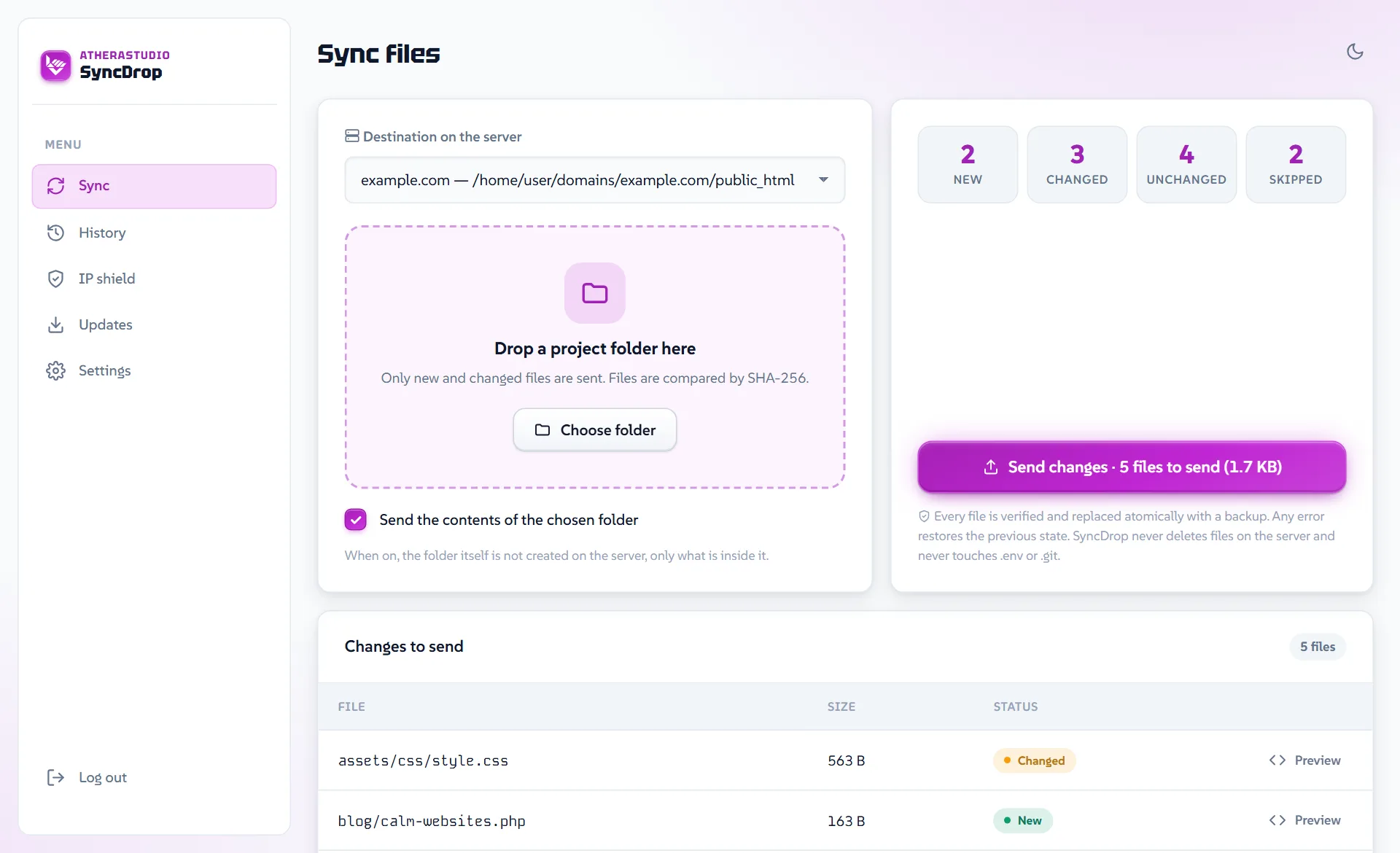

You do not have to remember which files you changed. SyncDrop compares them for you.
Your browser computes SHA-256 checksums and the server compares them with what it already has. File contents stay on your computer until you click Send.
You get a list of new and changed files, each with a code preview compared to the version on the server.
Files are uploaded in chunks and verified. They are replaced only once everything has arrived, and an error along the way undoes every change.
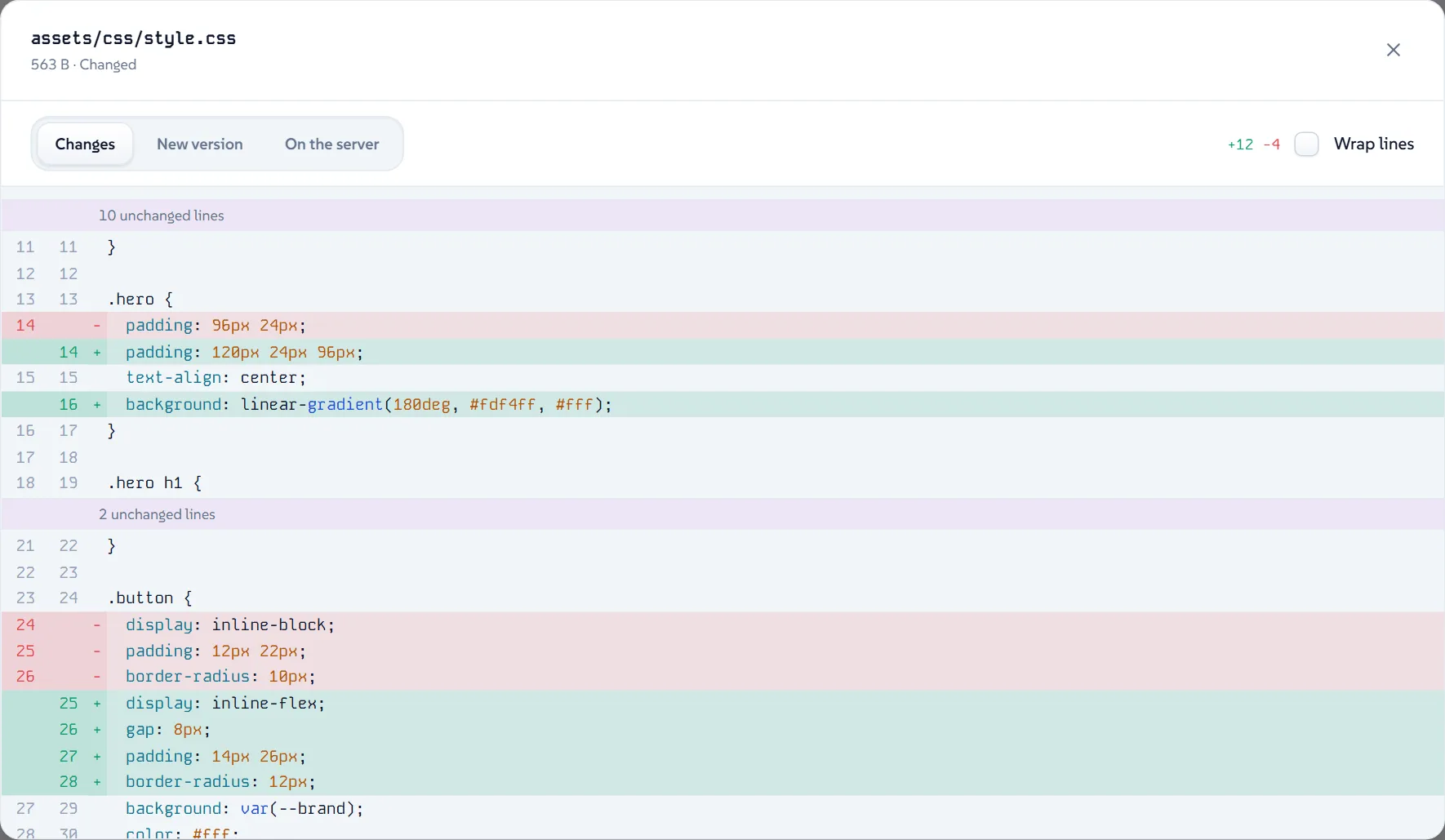
The Preview button next to a file compares the version on the server with the new one, line by line.

One folder on your server. No installer, no database, no third-party services.
Files are compared by SHA-256 checksums, so you send a few files instead of the whole project.
A backup is made before files are replaced. In History you can restore the state from before the latest deployment.
A diff with syntax highlighting, line numbers and folded unchanged parts.
In a subfolder of your site, as a subdomain or on its own domain. Several copies on one hosting account never mix.
Packages are digitally signed and verified before they are installed. A backup is made before every update and can be restored.
Fonts, icons and scripts ship with the package. Account data is kept outside the public folder of your site.
SyncDrop can write to your website files, so signing in and uploading are protected on several levels.
Signing in takes your password and a code from an authenticator app, plus 10 one-time recovery codes.
Proof-of-work and bot traps, and after failed attempts a digit captcha and a question for AI agents.
Scanners and suspicious requests collect points. Past the limit the address is banned for a day, a week, then a month.
When failed sign-ins come from many addresses at once, sign-in pauses for 10 minutes. Your trusted address can still sign in.
A message for every sign-in, lockout, ban, recovery code use and password change.
SyncDrop never deletes anything on the server and never overwrites .env, .git or its own data.
No SSH access or server configuration needed.
No. It only sends new and changed files. Files that are not in your folder stay on the server untouched.
No, you drop a regular folder. Nothing is unpacked on the server, and every file is checked on its own.
Files are replaced only after all of them have arrived and their checksums match. An error while replacing undoes every change.
In a folder outside the public directory of your site. The password is stored only as an Argon2id hash.
Yes. Add more destinations in Settings, each with its own exclusion list.
Only locally on your own computer. On a server it requires HTTPS, so passwords and files never travel in plain text.
Yes. SyncDrop is released under the SA-SDL license, so you can use it for free to deploy your own and your clients’ websites, including ones that make money. Approval is only needed to sell SyncDrop itself as a product or service once it brings in more than 1,500 USD a month.
Download SyncDrop, upload one folder and deploy only what changed.